Contents
What does a Verified email result mean in Adapt Leads?
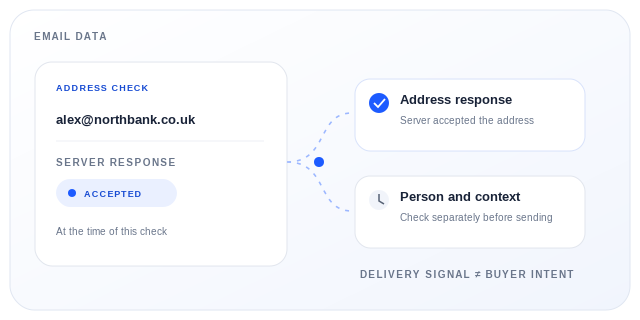
It records that the mail server accepted the address at the time of the check. That is evidence about the server response, not proof that the named person still works there or reads the inbox. Identity and relevance need separate evidence, while a catch-all response cannot confirm a specific mailbox. The result does not guarantee delivery or a reply.
- Verification is tied to the time and method of the check.
- A positive server response and strong evidence linking the address to a person are different things.
- Rejected, unanswered and catch-all results carry different uncertainty.
A green tick can look like a promise. In Adapt Leads, Verified describes a response from a mail server at the time of a check. It does not describe the person's job, interest or likelihood of replying.
What the check asks
The check asks the receiving mail system how it responds to an address without sending a message. A Verified result means the server accepted the address at that point. It is a useful delivery signal, but it is not proof that a named person owns or reads the inbox.
Mail systems can change their behaviour. A result may need another check before you use it, especially if the record or role has changed.
Separate email status from contact evidence
Keep two questions apart: how the server responded, and how well the address is supported as belonging to the right person. Adapt Leads' field labels provide context for the second question. An email can have a positive server response while the contact detail still needs another independent source.
What Verified does not tell you
It does not confirm that the person still works at the company, reads that inbox or wants your email. It does not guarantee inbox placement or a reply. Check the current role, company and reason for contact separately.
How to use each result
Use a server result as one piece of evidence. Check a person's role and the source behind the contact detail. Treat a catch-all response as uncertain, and do not use an address the server rejected. If the evidence is thin, verify it again or choose another route.
Questions to ask any data provider
Ask what a Verified result actually means, when the check happened, and how the provider distinguishes a server response from evidence about the person. Also ask how catch-all, unanswered and rejected results are shown. Clear labels help your team make a considered choice.
Email data
Email verification questions
Does Verified guarantee the email will be delivered?
No. It records that a mail server accepted the address at the time of the check. It does not guarantee inbox placement, current employment or a reply.
Does Verified confirm who owns the address?
No. Check the contact’s identity and role separately from the server response.
What does a catch-all result mean?
The server accepts many or all addresses, so the check cannot confirm a particular mailbox.
What should I do with a rejected address?
Do not use it for sending. Check the record or choose another appropriate contact route.
Know what each email result tells you
Review the label and evidence for an address before deciding whether it belongs in your workflow.
View a sample recordTalk to us
About the author
Jessica GardnerIn-house Editor, Adapt LeadsJessica writes Adapt Leads articles and guides on UK business data, prospect research and sales conversations.