Run approved LinkedIn outreach
from your own browser.
Build your prospect list and campaign in Adapt Leads, then use the Chrome extension to carry out approved LinkedIn steps from your own account. Review replies and recorded activity alongside your sales work. The profile panel shown below is still in development.
Part of this is live now: the extension already carries out your LinkedIn steps from your own browser. Showing the book beside a profile is the part we are building next, and this page describes how it will work.
Company information beside a LinkedIn profile.
The profile panel will check the profile against the book as you browse. If the person is in the book, it will show their business, their role and how we know. Until that matching is live, the extension's launch job is to run approved LinkedIn campaign steps.
The same extension runs your LinkedIn campaigns.
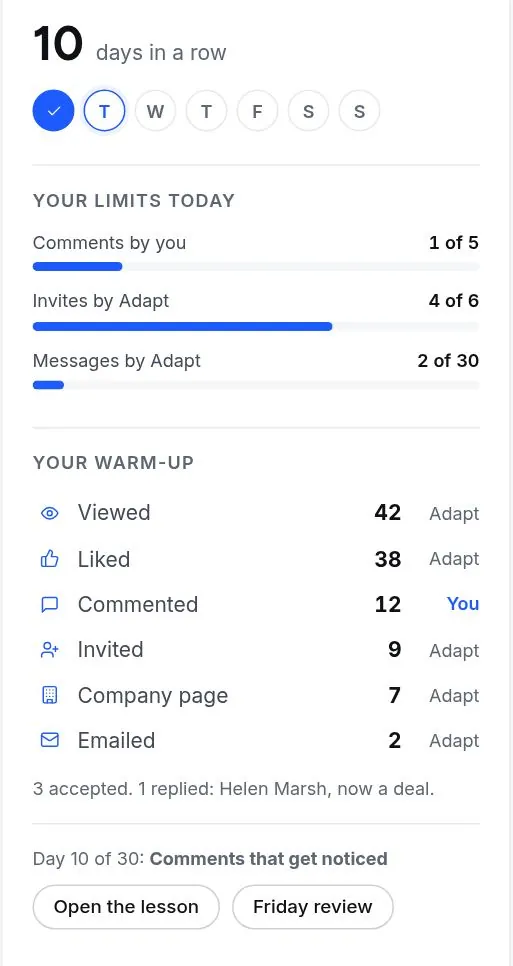
Your campaigns run in your own browser through the extension, so every action comes from your own account, on your own connection. Nothing is sent from our servers, and each invite and message waits for your OK.
What is available now, and what is being built?
Check a profile against the book
In build: see whether the person is in the book and which business they belong to.
Show how sure we are
In build: details come with their labels, so you can see what is proven and what is not.
Carry out your LinkedIn steps
Views, likes and invites go out from your own browser, at the pace you set.
Frequently asked questions
How do I get the extension?
You download it from LinkedIn settings in your account, then sign in to Adapt Leads from it.
Does it send anything from your servers?
No. LinkedIn actions run in your own browser. Our servers never touch your LinkedIn account.
Does it work in other browsers?
It is a Chrome extension. Other browsers are not supported yet.
Is it affiliated with LinkedIn?
No. Adapt Leads is not affiliated with LinkedIn Corporation.
Is the extension included in my plan?
Yes. The Adapt Leads Chrome extension is part of every plan, and you download it from your LinkedIn settings in the app.
Can it show the book beside a profile today?
Not yet. That is the part we are building next. Today the extension runs your LinkedIn steps from your own browser.
Do I need to keep the panel open?
No. Chrome needs to be open, but the extension does its work in the background, so the panel can stay closed.
How do I update the extension?
Download the latest version from your LinkedIn settings in Adapt Leads and replace the old one. The settings page shows which version is current.
Can I use Adapt Leads without the extension?
Yes. The book, email outreach, calls and the CRM all work without it. You only need the extension for LinkedIn.
Run LinkedIn from your own browser.
Connect the extension and work from your own account.