Better prospects. Better reasons to call.
Your CRM can tell you who to contact. Adapt helps your team understand who deserves attention, why they're worth calling and what to do next.
Better prospects. Better reasons to call.
Tell Adapt what you need
You know the businesses you want to work with. The difficult part is identifying which ones are worth contacting and making sure the right person follows up.
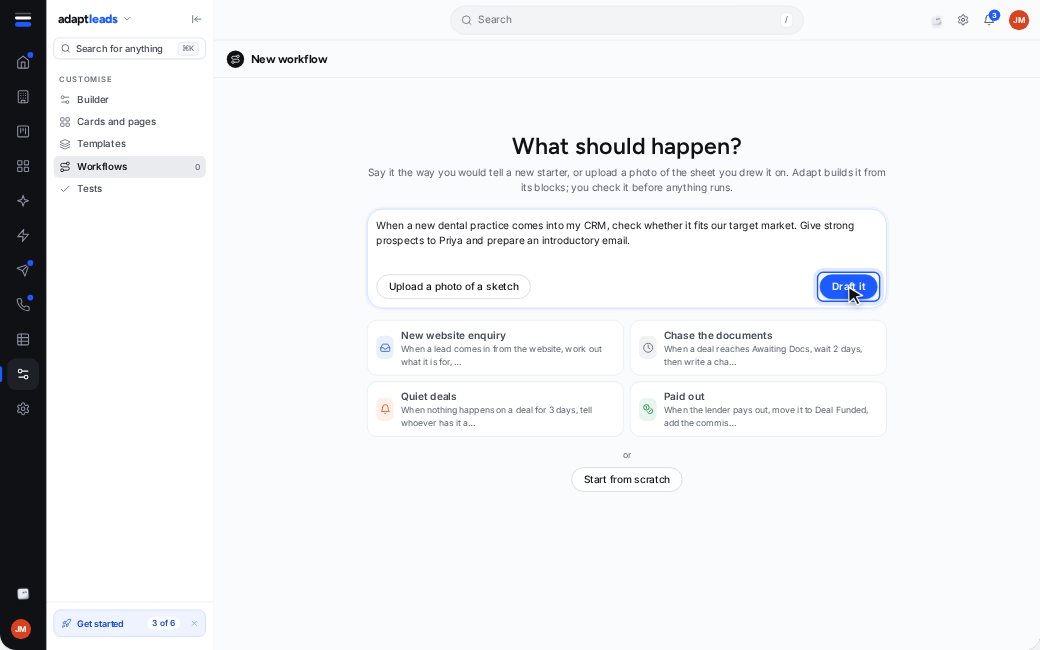
Tell Vela what you're looking for in ordinary English. For example: “When a new dental practice enters our CRM, check whether it fits our target market. Give the strongest prospects to Priya and prepare an introductory email.”
Vela builds a workflow draft using the people and fields in your workspace. You inspect it, test it and decide when to turn it on.
Research without the legwork
Before someone picks up the phone, they should know something about the business they're calling.
Adapt already holds UK company records and recent events, including company filings, director changes and hiring activity. The Search agent checks the information held against a business linked to your CRM record and brings useful facts into the workflow.
It doesn't search the open web or make an AI call for that research. The information is already in Adapt, so this step doesn't use credits.
Put the strongest prospects first
A long list isn't much help when every lead looks equally important.
Adapt checks businesses against your ideal customer profile and considers the recent changes on their records. Each gets a score out of 100 and an explanation of the reasons behind it.
You set the minimum score needed to continue. A strong prospect can go to a named salesperson, with the score and reasons saved on the record. Your team can see why a business was prioritised before making contact.
Your team makes the final call
Once a prospect qualifies, Adapt can prepare an email or LinkedIn message using the facts on its record.
Instead of starting with a generic introduction, your salesperson has a draft grounded in something relevant to that business. The message waits in the approvals inbox, where your team can inspect and edit it.
The workflow doesn't send messages automatically. Even approving the draft doesn't send it from the workflow. Your team remains responsible for what goes out under your name.
What it doesn't do yet
Workflow agents work with businesses linked to Adapt's UK records. They don't search the open web, and workflows don't yet support alternative branches or forms. If a record isn't linked, research stops rather than guessing. Vela agents for Adapt Workflows, in the help centre
Questions, answered
Do I need to build the workflow myself?
No. Describe what you want to Vela. It creates a draft for you to inspect, test and activate.
How does Adapt decide which leads are strongest?
It uses your saved ideal customer profile and recent reasons to reach out. You can set the score needed for a workflow to continue.
Will Adapt send emails without my approval?
No. Drafts wait in the approvals inbox. The workflow never sends them automatically.
Does the research use credits?
No. Research uses information already held in Adapt. Drafting a message with the AI writer uses credits.
Can I test it before switching it on?
Yes. Try it lets you inspect a workflow without changing records or spending credits.
Explore Workflows
See how your sales criteria become a process your team can review and run.